Sunday, September 20, 2015

INTERVIEW :: DESIGN/DEVELOPMENT :: DESIGN PATTERNS :: BASIC CONCEPTS


INTERVIEW
  DESIGN/DEVELOPMENT
    DESIGN PATTERNS
      BASIC CONCEPTS
 

In the following, which five design patterns are the creational patterns?

 1) Abstract Factory
 2) Adapter
 3) Bridge
 4) Builder
 5) Chain of Responsibility
 6) Command
 7) Composite
 8) Decorator
 9) Facade
10) Factory Method
11) Flyweight
12) Interpreter
13) Iterator
14) Mediator
15) Memento
16) Observer
17) Prototype
18) Proxy
19) Singleton
20) State
21) Strategy
22) Template Method
23) Visitor


Saturday, September 19, 2015

INTERVIEW :: DEVELOPMENT :: OBJECT ORIENTED PROGRAMMING :: BASIC CONCEPTS


INTERVIEW
  DEVELOPMENT
    OBJECT ORIENTED PROGRAMMING
      BASIC CONCEPTS
 

What is the difference between an Object and a Class?


An Efficient Quick Sort Function in Python

An Efficient Quick Sort Function


def EQS(arr):
    if len(arr) <= 1:
        return arr
    else:
        return EQS([x for x in arr[1:] if x < arr[0]]) + [arr[0]] + \
            EQS([x for x in arr[1:] if x >= arr[0]])


End of Function-----An Efficient Quick Sort Function in Python


example = [15,4,2,6,17,4,11,19]

print(EQS(example))

Precise Definitions for OOD and OOP

Precise Definitions for OOD and OOP

OOD is the modeling methodology of OOP; where, OOP is a programming model, in which identifying objects and recognizing its data pieces known as properties are the primary steps to generalize each object as a class. Once a class is plotted, each distinct logic sequence is considered for it as a method (like an action in a non-OOP world). Since a class, by its nature, does exist in one or more hierarchical systems, its positions and relationships are detected to provide the possibility of employing concepts of inheritance, abstraction, polymorphism (including overloading & overriding), etc. to optimize the code in terms of reusability, data hiding (encapsulation) and avoiding duplicate code snippets. 

_____________________________
OOD: Object Oriented Design
OOP: Object Oriented Programming

Friday, September 18, 2015

Google Analytics :: Tracking Code Overview (Ref: developers.google.com/analytics/)

Tracking Code Overview

Google Analytics works by the inclusion of a block of JavaScript code on pages in your website. When users to your website view a page, this JavaScript code references a JavaScript file which then executes the tracking operation for Analytics. The tracking operation retrieves data about the page request through various means and sends this information to the Analytics server via a list of parameters attached to a single-pixel image request.
Because your website configuration and reporting needs might differ from a standard setup, it's a good idea to understand the general tracking process to ensure that your reports deliver data as you expect. In this way, you can decide how to configure Analytics tracking to best suit your own website.
The rest of this document covers:

How Does Google Analytics Collect Data?

The data that Google Analytics uses to provide all the information in your reports comes from these sources:
  • The HTTP request of the user
  • Browser/system information
  • First-party cookies
The HTTP request for any web page contains details about the browser and the computer making the request, such as the hostname, the browser type, referrer, and language. In addition, the DOM of most browsers provides access to more detailed browser and system information, such as Java and Flash support and screen resolution. Analytics uses this information in constructing reports like the Map Overlay, Browser, and Referring Sites reports. Analytics also sets and reads first-party cookies on your users' browsers in order to obtain user session and any ad campaign information from the page request. The Google Analytics Tracking Code also reads the double-click cookie to get information about the Display Features.
When all this information is collected, it is sent to the Analytics servers in the form of a long list of parameters attached to a single-pixel GIF image request. The data contained in the GIF request is the data sent to the Google Analytics servers, which then gets processed and ends up in your reports. Here is an example of only a portion of a GIF request:
http://www.google-analytics.com/__utm.gif?utmwv=4&utmn=769876874&utmhn=example.com&utmcs=ISO-8859-1&utmsr=1280x1024&utmsc=32-bit&utmul=en-us&utmje=1&utmfl=9.0%20%20r115&utmcn=1&utmdt=GATC012%20setting%20variables&utmhid=2059107202&utmr=0&utmp=/auto/GATC012.html?utm_source=www.gatc012.org&utm_campaign=campaign+gatc012&utm_term=keywords+gatc012&utm_content=content+gatc012&utm_medium=medium+gatc012&utmac=UA-30138-1&utmcc=__utma%3D97315849.1774621898.1207701397.1207701397.1207701397.1%3B...  
For customers that have enabled the Remarketing with Google Analytics feature, a third-party DoubleClick cookie is used to enable remarketing for products like AdWords on the Google Display Network. When this feature is used, information (including the third-party DoubleClick cookie) is similarly sent to the Analytics servers, but the example request looks like:
http://stats.g.doubleclick.net/__utm.gif?utmwv=4&utmn=769876874&utmhn=example.com&utmcs=ISO-8859-1&utmsr=1280x1024&utmsc=32-bit&utmul=en-us&utmje=1&utmfl=9.0%20%20r115&utmcn=1&utmdt=GATC012%20setting%20variables&utmhid=2059107202&utmr=0&utmp=/auto/GATC012.html?utm_source=www.gatc012.org&utm_campaign=campaign+gatc012&utm_term=keywords+gatc012&utm_content=content+gatc012&utm_medium=medium+gatc012&utmac=UA-30138-1&utmcc=__utma%3D97315849.1774621898.1207701397.1207701397.1207701397.1%3B...
For more information on the data contained in a GIF request, see the section "GIF Request Parameters" in the Troubleshooting Guide.

How the Tracking Code Works

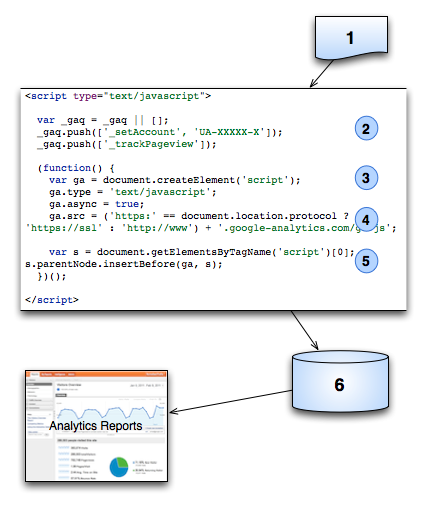
In general, the Google Analytics Tracking Code (GATC) retrieves web page data as follows:
  1. A browser requests a web page that contains the tracking code.
  2. A JavaScript Array named _gaq is created and tracking commands are pushed onto the array.
  3. A <script> element is created and enabled for asynchronous loading (loading in the background).
  4. The ga.js tracking code is fetched, with the appropriate protocol automatically detected. Once the code is fetched and loaded, the commands on the _gaq array are executed and the array is transformed into a tracking object. Subsequent tracking calls are made directly to Google Analytics.
  5. Loads the script element to the DOM.
  6. After the tracking code collects data, the GIF request is sent to the Analytics database for logging and post-processing.
GATC Request Process

How GIF Requests Are Classified

A GIF request is sent to the Analytics servers in the following cases and classified according to the table below. In each of these cases, the GIF request is identified by type in the utmt parameter. In addition, the type of the request also determines which data is sent to the Analytics servers. For example, transaction and item data is only sent to the Analytics servers when a purchase is made. User, page, and system information is only sent when an event is recorded or when a page loads, and the user-defined value is only sent when the _setVar method is called.
Request Type Description Class
Page A web page on your server is requested. Interaction
Event An event is triggered through Event Tracking that you set up on your site. Interaction
Transaction A purchase transaction occurred on your site. Interaction
Item Each item in a transaction is recorded with a GIF request. Interaction
Var A custom user segment is set and triggered by a user. Non-interaction
Requests classified as interaction requests will impact the bounce rate calculations for your page or site. Bounce rate is referred to as a single-page session to your site, but is strictly defined as a single interaction request during a user session. For this reason, a bounce rate for a page is also affected by ecommerce transactions and event tracking requests. This is because these features co-exist with page tracking and, when they are triggered, they result in additional interaction requests to the Analytics servers.

The GIF Request Parameters

The GIF request is quite long. Here is an example of only a part of a GIF request:
http://www.google-analytics.com/__utm.gif?utmwv=4&utmn=769876874&utmhn=example.com&utmcs=ISO-8859-1&utmsr=1280x1024&utmsc=32-bit&utmul=en-us&utmje=1&utmfl=9.0%20%20r115&utmcn=1&utmdt=GATC012%20setting%20variables&utmhid=2059107202&utmr=0&utmp=/auto/GATC012.html?utm_source=www.gatc012.org&utm_campaign=campaign+gatc012&utm_term=keywords+gatc012&utm_content=content+gatc012&utm_medium=medium+gatc012&utmac=UA-30138-1&utmcc=__utma%3D97315849.1774621898.1207701397.1207701397.1207701397.1%3B...   
This table contains a listing of the many of the parameters passed in via the GIF Request. Not all parameters are passed in with every execution of the tracking code, since some apply only to certain conditions, such as campaign referrals or shopping carts. When using this reference, keep in mind that you will be looking for those variables that most commonly apply to the page/request you are investigating.
Variable Description Example Value
utmac Account String. Appears on all requests. utmac=UA-2202604-2
utmcc Cookie values. This request parameter sends all the cookies requested from the page. utmcc=__utma%3D117243.1695285.22%3B%2B __utmz%3D117945243.1202416366.21.10. utmcsr%3Db%7C utmccn%3D(referral)%7C utmcmd%3Dreferral%7C utmcct%3D%252Fissue%3B%2B
utmcn Starts a new campaign session. Either utmcn or utmcr is present on any given request. Changes the campaign tracking data; but does not start a new session utmcn=1
utmcr Indicates a repeat campaign visit. This is set when any subsequent clicks occur on the same link. Either utmcn or utmcr is present on any given request. utmcr=1
utmcs Language encoding for the browser. Some browsers don't set this, in which case it is set to "-" utmcs=ISO-8859-1
utmdt Page title, which is a URL-encoded string. utmdt=analytics%20page%20test
utme Extensible Parameter Value is encoded. Used for events and custom variables.
utmfl Flash Version utmfl=9.0%20r48&
utmhn

Host Name, which is a URL-encoded string. utmhn=x343.gmodules.com
utmhid

A random number used to link Analytics GIF requests with AdSense. utmhid=2059107202
utmipc Product Code. This is the sku code for a given product.

utmipc=989898ajssi
utmipn Product Name, which is a URL-encoded string. utmipn=tee%20shirt
utmipr Unit Price. Set at the item level. Value is set to numbers only in U.S. currency format. utmipr=17100.32
utmiqt Quantity. utmiqt=4
utmiva Variations on an item. For example: large, medium, small, pink, white, black, green. String is URL-encoded. utmiva=red;
utmje Indicates if browser is Java-enabled. 1 is true. utmje=1
utmn Unique ID generated for each GIF request to prevent caching of the GIF image. utmn=1142651215
utmp Page request of the current page. utmp=/testDirectory/myPage.html
utmr Referral, complete URL. utmr=http://www.example.com/aboutUs/index.php?var=selected
utmsc Screen color depth utmsc=24-bit
utmsr Screen resolution utmsr=2400x1920&
utmt Indicates the type of request, which is one of: event, transaction, item, or custom variable. If this value is not present in the GIF request, the request is typed as page. utmt=event
utmtci Billing City utmtci=San%20Diego
utmtco Billing Country utmtco=United%20Kingdom
utmtid Order ID, URL-encoded string. utmtid=a2343898
utmtrg Billing region, URL-encoded string. utmtrg=New%20Brunswick
utmtsp Shipping cost. Values as for unit and price. utmtsp=23.95
utmtst Affiliation. Typically used for brick and mortar applications in ecommerce. utmtst=google%20mtv%20store
utmtto Total. Values as for unit and price. utmtto=334.56
utmttx Tax. Values as for unit and price. utmttx=29.16
utmul Browser language. utmul=pt-br
utmwv Tracking code version utmwv=1
=====================================================================
Ref: https://developers.google.com/analytics/resources/concepts/gaConceptsTrackingOverview
=====================================================================


Wednesday, September 16, 2015

Game Testing via a Simple Checklist


Game Testing via a Simple Checklist
Share

Check for Installation

On all the platforms being supported

Check for background music
and sound effects

ON/OFF sound & background music
Receive the call and check
Verify if sound effects are in sync with action
ON/OFF device sound(native sound) and check
Check for vibration effect if present

User Interface

Check in Landscape/Portrait mode
Check for animation, movement of character, graphics, Zoom In/Out (all gestures) etc
There should not be any clipping (cutted background)
Test whether one object overlaps with another
Verify if loading indicator is displayed wherever required
Character should not move out of the screen/specified area
Test for enable and disable images/icons/buttons etc
Check for screen title
Check for message title, message description, label (should be appropriate)
Check scrolling
Font displayed (color, size etc)
Check other objects too (ex -if its a car race- you need to look at road, people, other objects like buildings etc)

Performance

Check the loading time of a game
Make sure that any action is not taking considerable time, game flow should be fast

Score

score calculation
Verify leaderboards General/All time/Weekly/local etc
Check the score registration functionality
Check the format (whether, comma is required in score etc ideally if customer is a foriegner coma should be in millions not in thousands )
Check for level completion syncs with the score

Time Out

Check for time out
Do the actions when time-out yet to happen

Multitasking

Switch b/w different apps and play game , check for sound, score, UI, time-out etc

Pause

Check if game is paused when call received or multitasking or sleep mode

Save Settings

Turnoff and ON device, check if settings are saved
Log out /On , check same
User should not loose his game in above conditions

User profile

Put a all types of images in Player profile and check
Put special character, numbers,space in username and check
Password should be in masked

Chat feature

Check the profile images
max limit of chat description
Enter empty string, special character and check
For a opponent , there should be a notification that he has received a message

Functionality

Check game area, game logic
play till last level
get the cheat codes from development team and check all the levels
Check for the features that will be unlocked level-wise
Check for bonus score
Check the score hike when level gets increased
Check for multi-tap action (example in a car race we hold accelerator and left/right turn button simultaneously)
Menu options
Different game modes/location

Help & About Screen

Should be in easily understandable format
free from spelling mistakes
URL should be hyperlinked (depends)

Multiplayer game

Session expiry check
login/log out
Registration (Sign Up)
Verify account (receive verification mail)
login with registered but not verified account (without clicking verification link)
Forgot password checks (many cases here)
Game flow
Check for WIN/lost/Draw
Check user statistics graph
Challenge/Decline challenge/receive challenge
Check for forfeit
Check when player 2’s turn is on Player 1 is not able to do actions (should not be able to forfeit also)
Check for pass turn
Check for time-out (for one player)
Check the score for both the players till game ends

Memory leak

Check the game when device memory is low
Network (n/w) check

N/w messages if n/w is not present
check if what happens when n/w not present and user plays a move (whether score submitted for that move etc)

Check for localization

Should be Support of different languages

Check for date/time format

Change the device date/time , format etc

Size

User wont like if your game takes lot of device space, so keep one eye on game file size

Device , OS

Check in supported screen sizes and os versions (basicaly depend upon Client requirement)

Depends on platform

Sometime we need to check as per OS guidliness as well. For ex in Wp7 we need to check in 2 background (light/dark).

Check Share options

Post score via mail/FB/Twitter
Check the posted/sent messages in FB/Twitter/Mail. Check links are hyperlinked and application icon is displayed in
the post (depends)
If twitter integration is a manual ( custom UI developed by developer), check what happens when u enter more than
140 chars (as twitter limit is 140)

Music playing during app launche

If music player running and we start installing any game app, music player should pauses without prompting for the user permission.
Steps for checking this:
1. Play a music file.
2. Launch the application.
3. Verify that while the application loads, it does not pause, resume or stop the actively playing music.

Interuption

If app(game) is in running mode, then Check the behaviour of interuption like like Bluetooth, Infra red and CALL/SMS/MMS.

Upgrade the game
/ Battery effect

Upgrade of Games to the latest version and while migration all data should persist [ score, user profile etc ]
What if Battery goes down/switched of the cell while playing, Wheter the score wil get saved?

Uninstallation

On all the platforms being supported

Important: Level Check

All game levels should be tested

Money

Whether real or fake money, tester should keep track of it over days of testing.